Anxious: A Designer's Real-World Embroidery Review
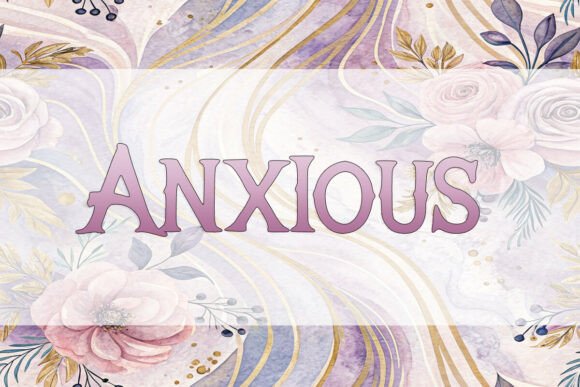
I have spent years stitching, designing, and reviewing thousands of machine embroidery design files for clients ranging from local boutiques to large-scale apparel decorators. When I first pulled up the Anxious font in my digitizing software, I didn't just see a typeface; I felt a specific mood. It is not your standard clean sans-serif or a traditional script. It has a jagged, energetic personality that screams "display" but requires careful handling when translated into thread.
This review is not about marketing fluff. It is about what happens when you take this digital asset and push it through an actual embroidery machine onto real fabric. As a professional designer who cares about the quality of the finished product, I need to know if Anxious will hold up on a customer's favorite hoodie or if it will look messy after one wash. Let's dive into how this font performs in the real world of handmade products and small business merchandise.
The First Stitch: Visual Personality and Mood
The name "Anxious" is no accident. The letterforms feel slightly tense, with irregular edges and a dynamic flow that suggests movement rather than stillness. In a digital mockup, it looks striking. However, embroidery is a tactile medium, and the way light hits the thread changes everything. This font category is perfectly tailored for projects where you want to make a statement immediately.
When I imagine using Anxious, I don't picture it on a delicate baby onesie unless the message is bold and modern. Instead, it feels like it belongs on items that embrace a bit of grit or raw creativity. The visual weight is heavy enough to stand out against dark fabrics, yet the unique shapes mean that stitch density must be managed carefully to avoid puckering. It creates an immediate emotional connection with the viewer, which is exactly what you want for a handmade product meant to sell on Etsy or at a craft fair.
Real Project Scenario: The Custom Tote Bag
Let's walk through a practical scenario. Imagine you are an Etsy seller preparing a batch of custom embroidered tote bags for a holiday gift season. You want something that stands out on a crowded shelf. You decide to use Anxious for a slogan like "Stay Calm" or perhaps something more abstract that fits the brand vibe.
Here is where the rubber meets the road. On a canvas tote bag, the fabric texture is rough. If you simply import the file without adjusting the thread colors or checking the stabilizer choice, the tension of the Anxious letters might cause the canvas to pucker significantly around the sharp corners of the letters. The font's unique style relies on clean lines, but embroidery often introduces slight distortions.
If executed correctly, however, the result is stunning. The irregularity of the letters adds character that a standard font cannot achieve. Customers scrolling through photos of your shop would stop because the text looks intentional and artistic, not generic. It elevates a simple $15 tote bag into a piece of wearable art. But this only works if you test the design on scrap fabric first to ensure the running stitch and satin stitch areas align perfectly with the weave of the bag material.
Where Anxious Shines in Commercial Embroidery
For those running a craft business or selling small shop products, knowing where to place Anxious is half the battle. This embroidery file excels in applications where space is generous and the fabric is stable.
- Sweatshirt Embroidery: The thick cotton fleece of a sweatshirt provides a great base for the dense fill stitches required by this font. The texture of the fabric hides minor imperfections, making Anxious look robust and high-quality.
- Patches and Badges: Creating an embroidered patch with this font can yield a very edgy, streetwear aesthetic. The unique shape of the letters allows for creative backing designs that enhance the overall look.
- Kitchen Towels and Aprons: For a boutique kitchen line, Anxious adds a modern, slightly chaotic charm that fits well with rustic or industrial decor themes. It breaks the monotony of traditional cursive scripts often found in home goods.
- Holiday Gifts: Personalized gifts often benefit from fonts with personality. Using Anxious on a pillow cover or a blanket for a teenager or young adult recipient shows a level of thoughtfulness that goes beyond standard monograms.
In these scenarios, the font acts as a design asset that drives engagement. It signals to the buyer that the creator understands current trends and isn't just using default templates. This builds customer trust and enhances brand consistency.
Critical Pitfalls and Where to Use Caution
However, I must be honest about where Anxious can fail if used without consideration. This is not a "one size fits all" solution. There are specific situations where this font will struggle, and ignoring them could ruin a finished product.
First, avoid using this on small hoop sizes. The intricate details and unique curves of the letters require space to breathe. If you try to cram Anxious onto a 4x4 inch area on a cap brim or a tiny baby bootie, the threads will crowd each other. The stitch density may become too high, leading to needle breakage or a stiff, uncomfortable feel on the garment.
Second, be wary of stretchy fabrics like thin jersey or spandex blends. The tension of the embroidery can cause the fabric to ripple, distorting the already complex shapes of the letters. Similarly, on textured fabrics like bouclé or heavily napped materials, the fine details of the font may get lost in the pile of the fabric.
Detailed corners are another weak point. If the font has sharp points or tight loops, they may not stitch cleanly on a curved surface like a baseball cap. The curvature of the hat can flatten the letters, making them look wider and less distinct. Always inspect small details before committing to a full production run.
Practical Notes for the Design Professional
Before you hit the start button on your machine, there are several steps every embroidery designer should take to ensure success with Anxious.
- Test on Scrap Fabric: Never assume the settings will work perfectly. Run a test on the exact fabric you plan to use. Check how the thread colors interact with the material under different lighting conditions.
- Review Stabilizer Choice: Depending on the project, you may need a cut-away stabilizer for stability or a tear-away for softer hand-feel. The wrong choice can lead to distortion.
- Check File Specifications: Ensure you know the recommended hoop size and file formats for your specific machine. If the instructions do not specify compatibility, verify this with your machine manufacturer.
- Licensing Verification: If you are creating items to sell, confirm the licensing terms. Does the purchase allow for commercial use? Are there restrictions on the number of units you can produce?
- Mockup Testing: Create black and white mockups to check the legibility of the text. Sometimes color hides spacing issues that become obvious in grayscale.
Final Verdict on Anxious
Anxious is a powerful tool in the arsenal of a creative entrepreneur. It brings a unique energy to custom apparel and personalized gifts that standard fonts simply cannot match. When applied to the right project—like a sturdy tote bag, a fashion-forward sweatshirt, or a decorative pillow—it transforms a basic item into a conversation starter.
But remember, the difference between a successful commercial embroidery project and a failed one often lies in the preparation. By respecting the limitations of the font, choosing the right materials, and testing thoroughly, you can leverage the captivating style of Anxious to create products that customers love and respect. It is a font that demands attention, and if handled with care, it delivers results that are truly worth the investment.